OpenClaw Users: Why Is Your Token Budget Disappearing Out of Nowhere?
Turns out, heartbeat has been quietly eating your tokens all along.
Background
OpenClaw has become one of the hottest open-source AI gateway projects. With 18,000+ commits and a rapidly growing community, it connects messaging platforms — Telegram, Discord, Slack, MS Teams, Lark, Matrix, and more — to various LLM providers. For many teams building AI-powered chatbots and agents, OpenClaw has become the go-to solution.
But as adoption grows, so do user complaints — and one issue stands out: token consumption is way higher than expected. Users report mysterious token budget drains, conversation histories that grow without bound, and system prompts bloating to 29K characters. Some hit the 200K token limit repeatedly, even with lightContext: true configured. These aren’t edge cases — they’re common pain points affecting real users and real budgets.
What’s going on? Is it a misconfiguration? A model issue? Or something deeper in the codebase itself?
To find out, we analyzed the entire OpenClaw codebase using NeuG (graph database) + zvec (vector index), producing a code knowledge graph with 21,057 functions and 35,761 call edges. What we discovered was surprising: one of the biggest token consumers is hiding in plain sight — the heartbeat mechanism.
In this article, we start from the end-user perspective and trace how a supposedly “lightweight” timer became a token-eating machine. Follow-up articles will cover the extension developer and core maintainer perspectives.
The Problem: Session History That Never Stops Growing
If you are using OpenClaw and experiencing any of the following:
- Conversation history that grows indefinitely without being truncated
- A system prompt that bloats unexpectedly (one user reported 29K characters)
- Repeatedly hitting the model’s 200K token limit
lightContext: trueconfigured in HEARTBEAT.md, but with no noticeable effect
This is likely not a misconfiguration or a model issue. One easily overlooked cause is OpenClaw’s heartbeat mechanism.
What Is Heartbeat Secretly Doing?
OpenClaw’s heartbeat is a periodic timer. By design, it is supposed to be a lightweight tick that keeps the agent alive. We traced its call chain using CodeScope, and the results were surprising.
Step 1: Locate All Heartbeat-Related Code
CodeScope provides two retrieval methods: text search (string matching) and semantic search (vector similarity). For a well-named codebase like OpenClaw, keyword search is usually sufficient to locate the core code. We query all functions containing heartbeat:
MATCH (f:Function)
WHERE f.name CONTAINS 'heartbeat' OR f.name CONTAINS 'Heartbeat'
RETURN f.name, f.file_path
ORDER BY f.file_path
The query returns 68 functions spread across 10 modules — infra, auto-reply, gateway, config, cron, and others. We visualized the results using neug-ui:
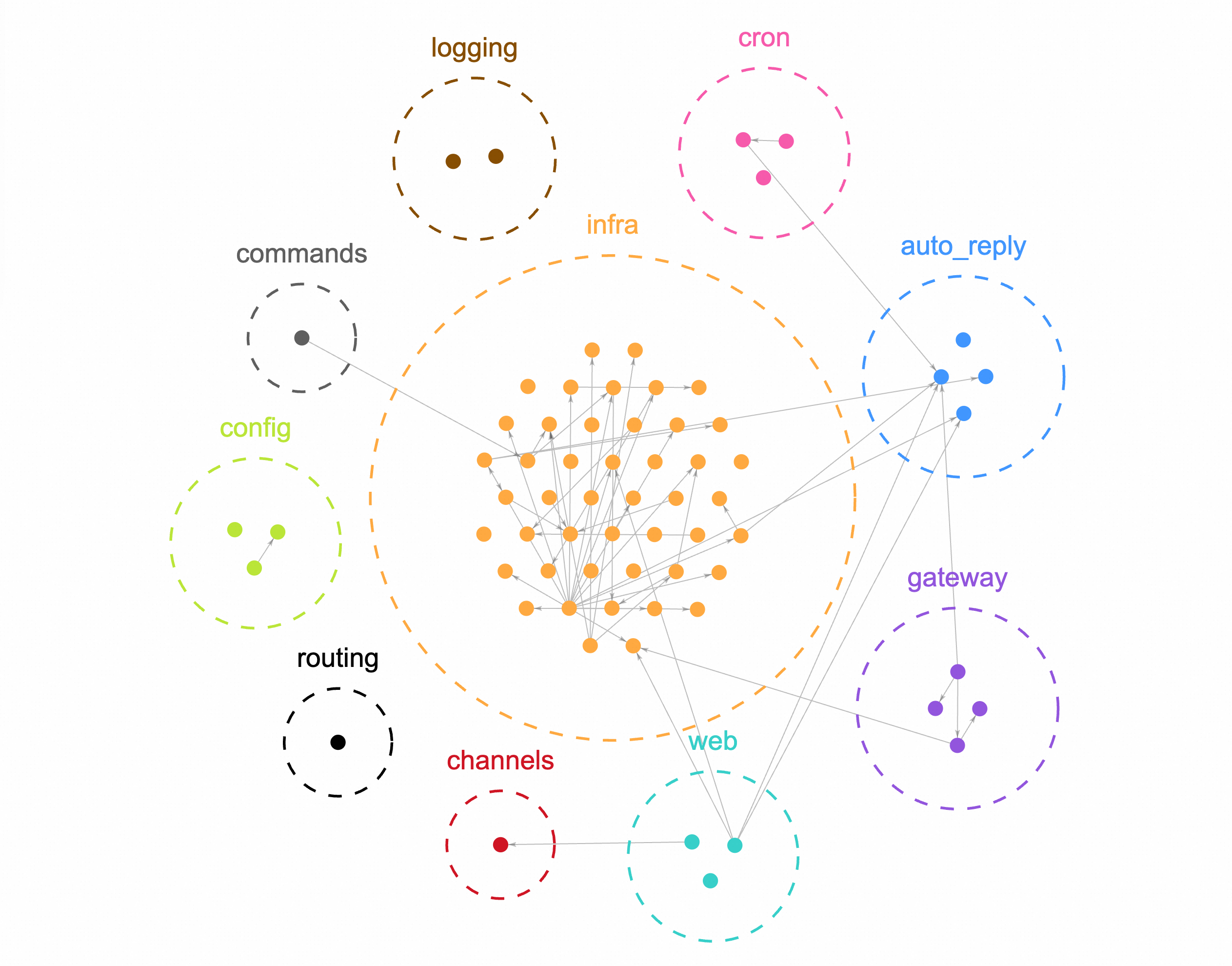
The infra module has the heaviest heartbeat presence, and most of it is concentrated in heartbeat-runner.ts.
This is where conventional approaches stop. Once you have the 68 functions and the core file, the usual next step is to feed the code to an LLM and ask it to explain. That process consumes tokens itself, and what you get back is a text description — not a queryable structure. You cannot directly ask: “Who calls whom?”, “How deep does the call chain go?”, “Which function is the structural center?”
Graph analysis takes a different approach: instead of reading code content, we model the function-to-function call relationships as a graph, turning structural questions into graph queries.
Step 2: Find the Core Entry Point via the Call Graph
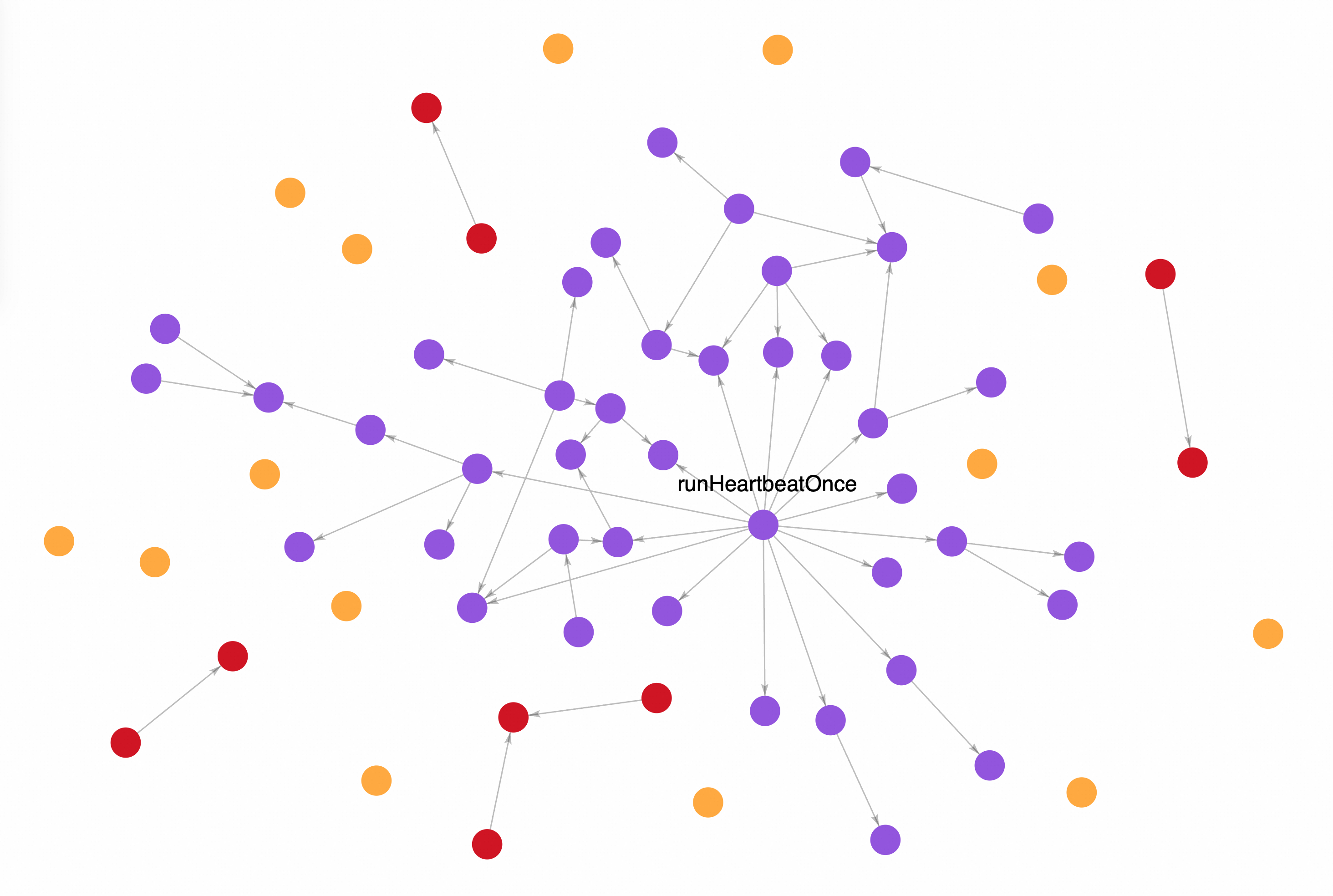
We build a connectivity graph from the call relationships among the 68 functions and group them by connected component. The largest component contains 45 functions, indicating they form a tightly coupled core module. The remaining 19 components average just 1.2 functions each — mostly standalone interface or configuration functions.
We then ran centrality analysis on the largest component: runHeartbeatOnce connects 27 functions within 3 hops. The second-ranked function connects only 6. The gap is decisive: runHeartbeatOnce is the core entry point of the entire heartbeat mechanism. Results below:
Step 3: Expand the Call Chain — What Does It Actually Touch?
We expand the multi-hop outgoing edges of runHeartbeatOnce to find all context-loading functions it directly or indirectly calls:
// Find context-loading functions in the runHeartbeatOnce call chain
MATCH (f:Function {name: 'runHeartbeatOnce'})-[:CALLS*1..3]->(t:Function)
WHERE t.name CONTAINS 'Context'
   OR t.name CONTAINS 'Workspace'
   OR t.name CONTAINS 'Session'
   OR t.name CONTAINS 'Prompt'
RETURN t.name, t.file_path
ORDER BY t.file_path
Results:
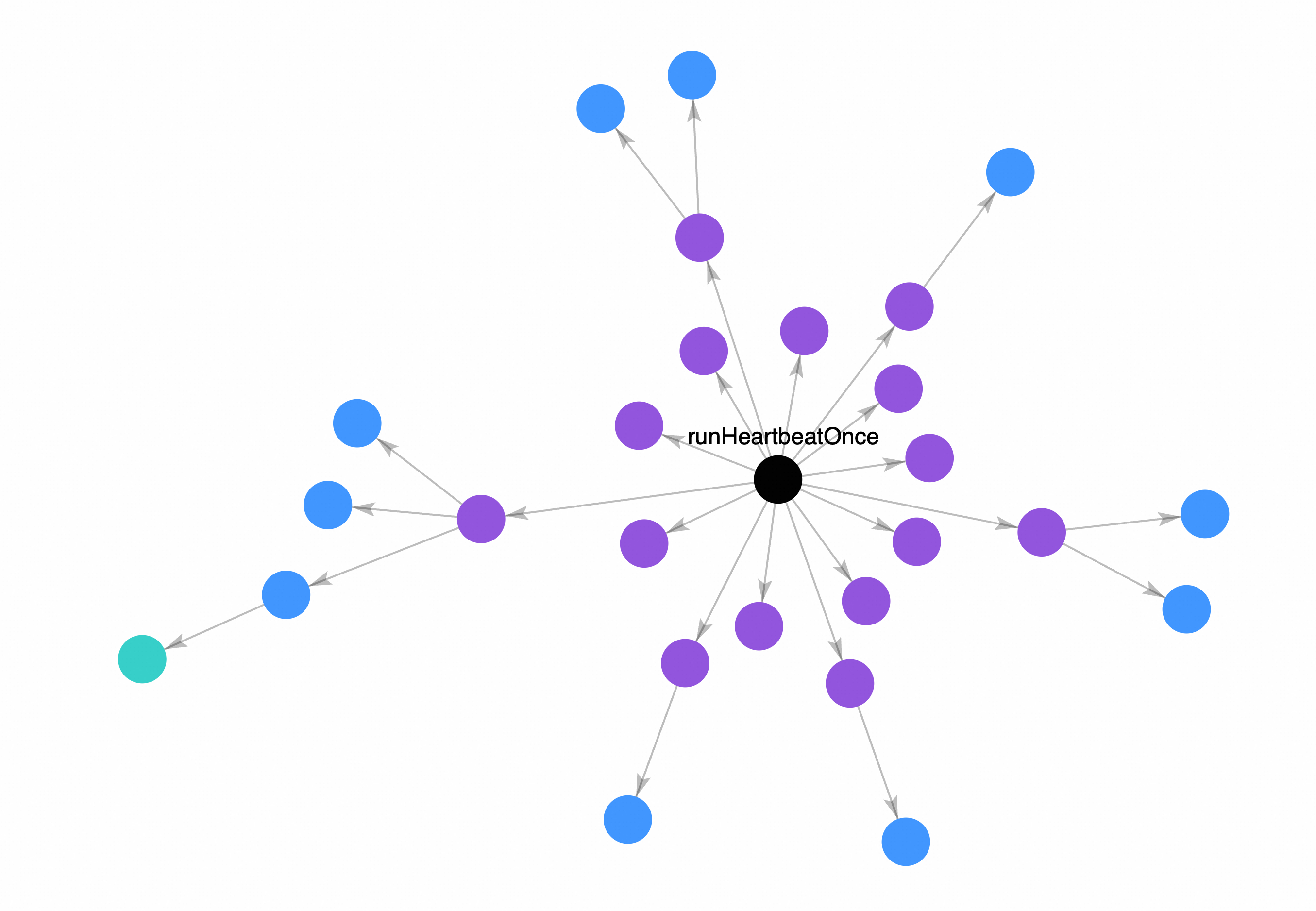
Every heartbeat tick triggers all of these functions — loading the workspace directory, building a full session context, generating a complete prompt. runHeartbeatOnce has 15 direct callees, each involved in parsing heartbeat configuration and assembling context. This is the structural root cause of heartbeat being far heavier than its design intended.
Why Doesn’t lightContext: true Help?
You may have set lightContext: true in HEARTBEAT.md, expecting heartbeat to load only a lightweight context.
lightContext is a configuration flag, but it cannot change the structure of the call chain. As long as the dependency tree of heartbeat remains intact, every tick must load the workspace, build the session context, and traverse multiple modules. This is a path determined by the code structure — it cannot be bypassed by a flag.
We also analyzed the modification frequency of the most recent 200 commits: 4 out of 21 functions in the context-pruning module (responsible for context trimming) have been repeatedly modified recently. This indicates the OpenClaw team is aware of the context bloat problem and is actively working on a fix — but a stable solution is not yet available.
CodeGraph: Reproduce This Analysis Yourself
We have packaged the entire analysis workflow into a CodeGraph Skill, published inside NeuG. You can use it to reproduce every query in this article.
Prerequisites
CodeScope requires Python 3.10+ and PyTorch 2.4+.
pip install codegraph-ai
Environment variables:
# Use HuggingFace offline mode if you have already downloaded the models
export HF_HUB_OFFLINE="1"
# Set the database directory
export CODESCOPE_DB_DIR="/path/to/your/project/.codegraph"
Building the Index
Index the OpenClaw repository:
# Build the index (first run)
codegraph init --repo /path/to/openclaw --lang auto --commits 100
# Check index status
codegraph status --db $CODESCOPE_DB_DIR
Sample output:
============================================================
CodeScope Index Summary
============================================================
  Files:      7083  (+ 5774 external)
  Functions:  24173  (+ 0 historical)
  Call edges: 41269
  Vectors:    24173
  Imports:    28877
  Classes:    255
  Modules:    380
Once indexed, you can query the graph via CLI or Python SDK.
CLI
Check the database status:
codegraph status --db $CODESCOPE_DB_DIR
Sample output:
============================================================
CodeScope Index Status: /path/to/.codegraph
============================================================

Graph:
  File        :     12,857
  Function    :     24,173
  Class       :        255
  Module      :        380
  Commit      :        100

Edges:
  CALLS       :     41,269
  TOUCHES     :        605
  MODIFIES    :          0

Backfill: 0/100 commits have MODIFIES edges
  100 commits still need backfill

Vectors: 24,173 function embeddings
Natural language query:
codegraph query "Who calls runHeartbeatOnce?" --db $CODESCOPE_DB_DIR
Output:
Question type: structural
Retrieved 6 evidence items in 76ms:

[1] (caller) executeJobCore (src/cron/service/timer.ts) — hop=1, relevance=0.000
[2] (caller) createGatewayReloadHandlers (src/gateway/server-reload-handlers.ts) — hop=2, relevance=0.000
[3] (caller) startGatewayServer (src/gateway/server.impl.ts) — hop=2, relevance=0.000
[4] (caller) executeJob (src/cron/service/timer.ts) — hop=2, relevance=0.000
[5] (caller) executeJobCoreWithTimeout (src/cron/service/timer.ts) — hop=2, relevance=0.000
[6] (caller) buildGatewayCronService (src/gateway/server-cron.ts) — hop=1, relevance=0.000
Generate a full architecture report with multi-dimensional analysis:
codegraph analyze --db $CODESCOPE_DB_DIR --output architecture-report.md
Python SDK
For more complex queries — such as the multi-hop call chain traversal used in this analysis — call the CodeGraph Python API directly, using runHeartbeatOnce as an example:
import os
os.environ['HF_HUB_OFFLINE'] = '1'
from codegraph.core import CodeScope

cs = CodeScope(os.environ['CODESCOPE_DB_DIR'])

rows = list(cs.conn.execute('''
    MATCH (f:Function {name: 'runHeartbeatOnce'})-[:CALLS*1..3]->(t:Function)
    WHERE t.name CONTAINS 'Context'
       OR t.name CONTAINS 'Workspace'
       OR t.name CONTAINS 'Session'
       OR t.name CONTAINS 'Prompt'
    RETURN t.name, t.file_path
    ORDER BY t.file_path
'''))
for r in rows:
    print(f"{r[0]} @ {r[1]}")

cs.close()
We will continue to publish more analysis angles on OpenClaw. If you want to explore further or try your own queries, give CodeGraph a try.
What You Can Do Now: Four Practical Mitigations
1. Treat heartbeat as a heavyweight operation
Do not assume heartbeat is lightweight. When estimating token budgets, count every heartbeat tick as a real consumption event. Do not rely on lightContext: true to save tokens.
2. Reduce heartbeat trigger frequency
If your use case does not strictly depend on real-time heartbeat behavior, lowering the trigger frequency is the most direct and effective way to reduce token consumption. Fewer ticks = fewer full context loads.
3. Manually cap session history length
Do not rely on OpenClaw to auto-truncate conversation history. Explicitly set a maximum history count in your configuration to prevent unbounded accumulation.
4. Monitor for periodic token spikes
Enable token usage monitoring on the LLM provider side. If you observe periodic, clock-like token spikes (rather than growth correlated with conversation length), heartbeat is likely triggering full context loads on schedule.
Summary
We dissected heartbeat across three analytical layers:
- Function distribution: 68 heartbeat-related functions spread across 10+ modules, with the heaviest concentration in
heartbeat-runner.ts - Call graph centrality:
runHeartbeatOnceis the core entry point — 15 direct callees, 27 functions reachable within 3 hops - Call chain expansion: every tick loads the workspace directory and builds full session context, with a load comparable to processing a complete user message
Together, these findings explain one observation: heartbeat is designed as a lightweight timer, but its actual execution path is structurally equivalent to a full message-processing pipeline. lightContext: true cannot override this. Until an official fix is available, reducing heartbeat trigger frequency and manually capping session history length are the most effective mitigations.
This analysis is based on a scan of the OpenClaw codebase using NeuG graph database and zvec vector index.