AI-Powered Open Source Development Management: NeuG's Exploration and Practice
NeuG is a lightweight, high-performance embedded graph database open-sourced by the GraphScope team. It can be installed with a simple pip install neug and is designed for local analytics and real-time transaction processing. In this article, we share how we leverage AI capabilities to manage NeuG’s development workflow. In the future, we will further explore how NeuG’s graph computing capabilities can empower AI in return.
We invite you to follow and star NeuG repository!
For more technical details, please refer to the NeuG official documentation.
Pain Points in Open Source Development: Lack of Comprehensive Project Management
Managing open source software projects is one of the biggest pain points in the development process. If an engineer only focuses on writing code without an efficient management and tracking mechanism, the final product will struggle to be delivered on time. This is because open source projects inherently possess dynamic uncertainty — requirements can change at any moment.
In recent months, AI Coding capabilities have been rapidly improving. However, we have found that the imbalance between development and management has actually worsened: developers can leverage the latest and most powerful models to rapidly generate large volumes of code, but this seemingly functional yet poorly readable and architecturally weak code only adds to the project management burden. As code accumulates, it may well be that only the large language model itself can deconstruct such a complex repository.
In reality, we don’t lack coding capability. On the contrary, in open source projects, designing and breaking down solutions and tracking development progress are far more important. Taking our team’s NeuG development as an example, the upfront PRD design and discussion can take up a third or even more of the entire development cycle. The recently popular “vibe-coding” is really only suitable for personal projects built from scratch — for serious development scenarios like databases, it is virtually inapplicable.
Based on these reflections, we tried introducing AI tools into NeuG development in the role of “manager” rather than “developer,” covering the entire lifecycle from requirements analysis and task decomposition to GitHub synchronization and tracking.
Spec-Driven: The Best Development Paradigm for NeuG
In our early exploration, we still followed a “vibe-coding”-style workflow, letting AI directly manage requirements. We iterated through multiple versions:
-
Developers write PRD documents, and the Coding Agent parses the context to decompose tasks, syncing them to GitHub.
-
The Coding Agent parses the Markdown structure of PRD documents before decomposing tasks.
-
The Coding Agent converts PRD documents into a standardized intermediate format before parsing and decomposing tasks.
Throughout this exploration, we continuously encountered common pain points such as detail loss from overly long contexts and inconsistent outputs. However, we gradually realized that a structured context might be the paradigm best suited for NeuG development. Many AI products also adopt similar structured contexts — for example, DingTalk’s meeting minutes allow pre-selecting templates, and some project documentation tools offer fully customized templates. After testing, we found that while enforcing output format alignment makes some content read a bit stiffly (for example, some development tasks simply don’t need corresponding unit tests), the completeness of such documents effectively reduces omissions — trimming is always easier than patching.
Meanwhile, a wealth of Spec-Driven tools have been open-sourced, and we were among the first to try them. We found that the paradigm of “write project specifications first, then generate project code” highly aligned with our needs. Taking GitHub’s official speckit as an example, here’s a brief explanation of what Spec-Driven involves and what each step does:
-
Specify. In this phase, users provide a requirements description. This phase doesn’t involve specific technology stacks but focuses on product-level analysis: Who will use it? What features does it provide? What problems does it solve? What are the inputs and outputs? What is the interaction flow?
-
Plan. In this phase, the AI tool generates a comprehensive development plan. This phase focuses on designing how to incorporate the requirement into the existing codebase, which modules are affected, and what constraints must be maintained. It therefore requires comprehensive code, architecture, and constraint information, with strict confirmation from development experts.
-
Tasks. In this phase, the AI tool further decomposes the Plan into several executable tasks. Each task is a minimal, independently runnable code unit, making it convenient for the AI tool to test after code completion. Simply put, each task can be viewed as a standalone function.
-
Implement. In this phase, the AI tool incrementally completes each task from the Tasks phase. Thanks to the well-prepared Specify, Plan, and Tasks, the AI tool can generate more accurate code that integrates better with the existing context.
Additionally, these Spec-Driven tools interact with the Coding Agent through slash commands. This invocation style is completely transparent and flexible, and users can freely adjust the prompts in Markdown files to create their own specifications. As we encountered the problem of overly verbose generated content, we began migrating our daily development habits into prompts, which significantly improved results. Below, we use a simple example to illustrate how NeuG leverages the Spec-Driven development paradigm to improve efficiency.
Use Case: Adding Multi-threaded Transaction Tests to NeuG
Background: Transaction functionality is one of the most important — and most error-prone — modules in a database. NeuG’s transaction engine implements lock-free read-insert parallelism and serializable isolation based on MVCC (see NeuG Transaction Mechanism Explained for details). To ensure this module executes correctly, we need to add various transaction tests. We attempted to use the Spec-Driven approach to let the large language model handle the entire process.
Specify Phase: Task Expansion and Analysis
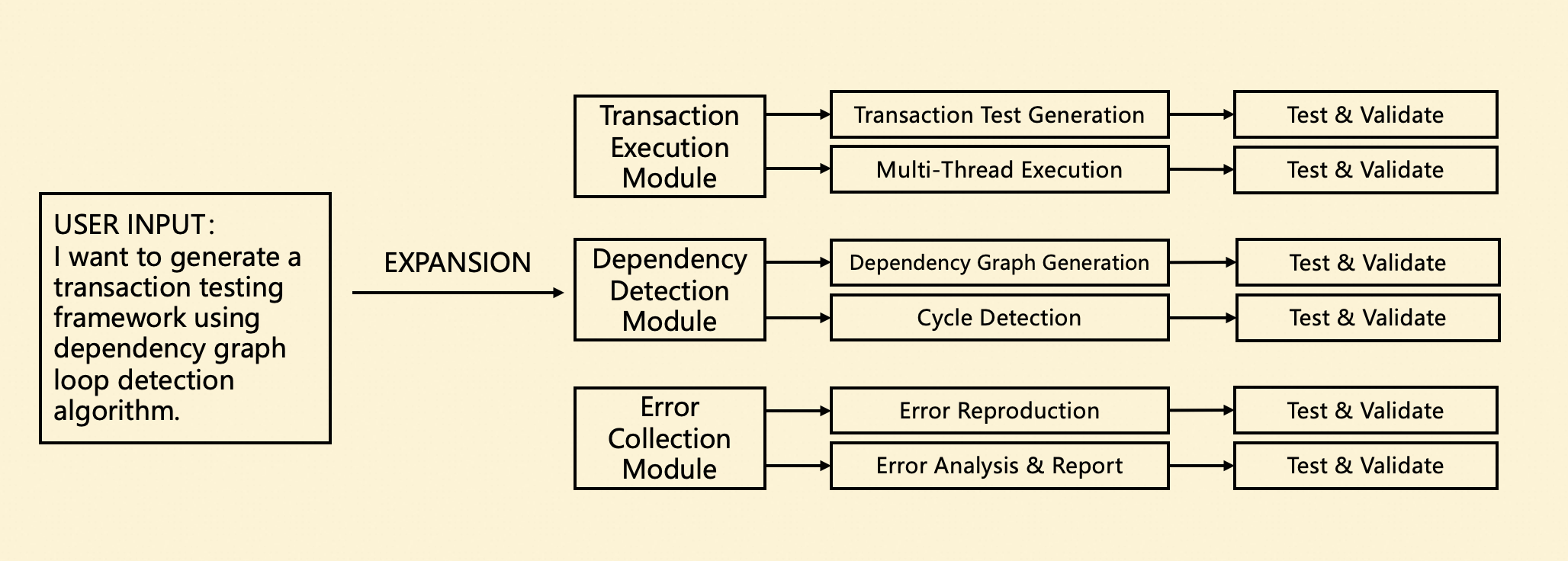
In the Specify phase, users can provide a brief requirements description along with some draft documentation (no format or content requirements), and the model independently organizes, expands, and generates a complete PRD document.
In NeuG’s previous development workflow, PRD document design was a crucial step. However, writing a complete PRD document was extremely tedious and difficult to account for all edge cases and special scenarios. During the model’s document generation process, we enforced a document structure where a requirement is split into multiple modules, each module is further decomposed into multiple tasks, and each task must include corresponding tests and verification to ensure document completeness.
Even when a task genuinely doesn’t need testing or verification (for example, cycle detection can directly call a third-party library), we still ask the model to list relevant content whenever possible. If some redundant content truly needs to be removed, we can simply edit it ourselves or prompt the model to modify the document. From practical experience, “trimming excess” is always easier than “filling gaps.”
Plan Phase: Persisting Implementation Details
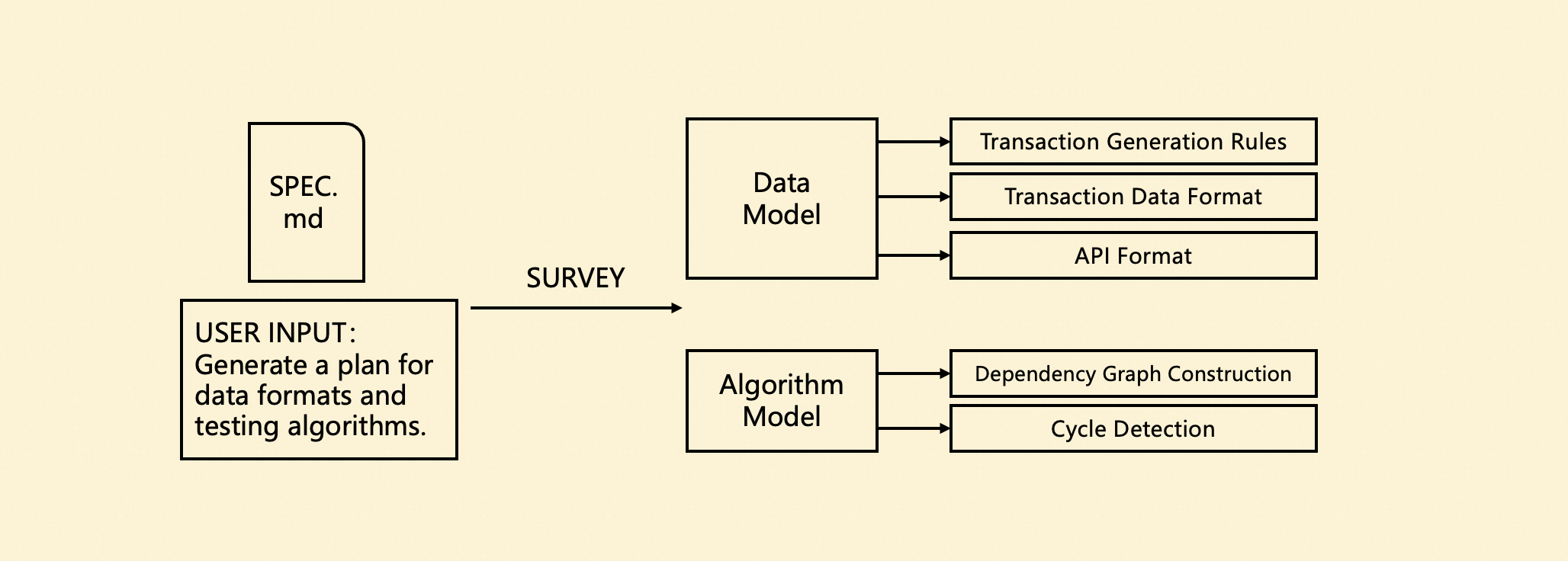
The Plan phase is primarily responsible for further refining technical details and technology choices that weren’t covered in the Specify phase.
During NeuG’s product development, we found that many design decisions are difficult to reflect intuitively in code, and the related technical documentation often lacks maintenance, directly leading to collaboration and handoff difficulties. As a solution, we chose to persist extensive technical details during the Plan phase. This content effectively serves as supplementary context for the Coding Agent’s code generation and provides convenience when producing technical reports later.
As shown in the figure below, we needed to standardize transaction generation ratios and data formats, and determine transaction execution strategies for multi-threaded scenarios. Additionally, transaction testing relies on specific testing workflows, requiring detailed descriptions of dependency graph construction, dependency analysis, and cycle detection algorithms. This content significantly improves the accuracy and consistency of subsequent code generation.
Tasks Phase: Decomposing Tasks, Syncing to GitHub
In the Tasks phase, the Coding Agent generates several Modules and Tasks based on the previous documents and syncs them to GitHub Issues. Our hierarchical structure perfectly aligns with GitHub’s Sub-Issue feature, making it convenient to track the entire development progress of a requirement end-to-end.
In NeuG’s past development, these Issues were created and linked manually — not only time-consuming and labor-intensive, but when a new requirement was inserted, older requirements were often overlooked. Through the Task phase tracking, we can not only generate Issues with one click but also persistently track the completion status of all Issues, preventing development tasks from stalling midway.
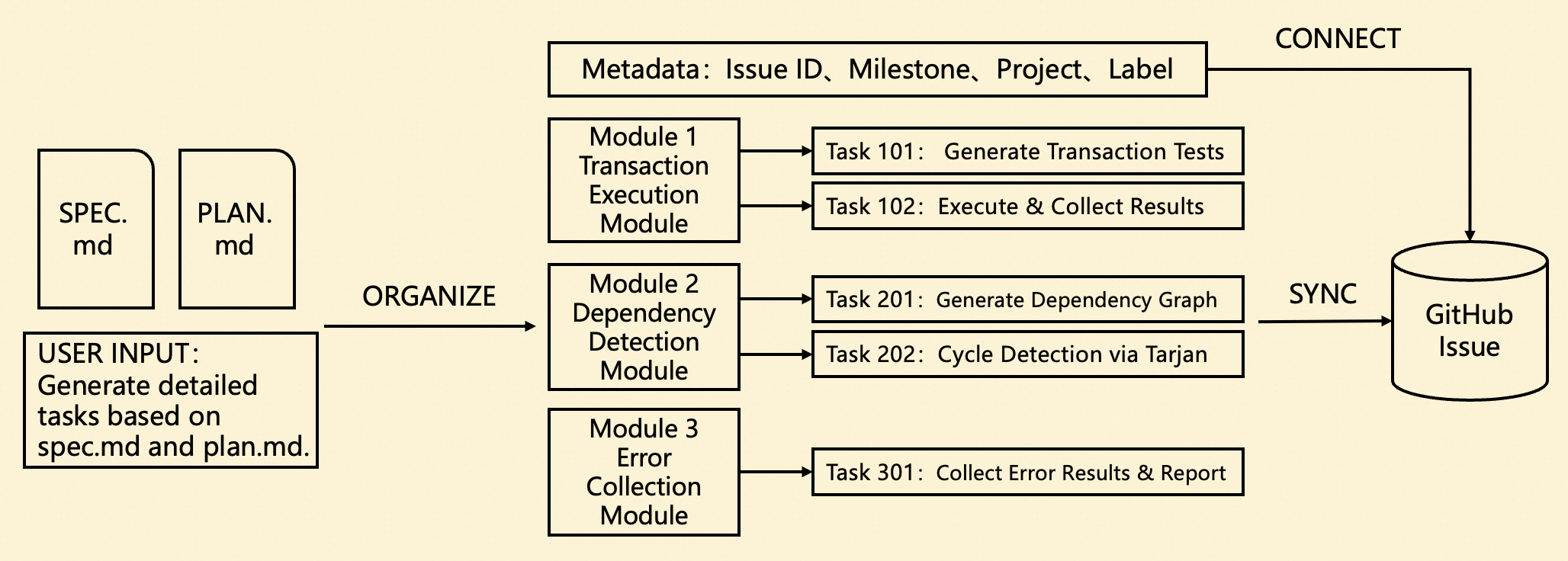
Furthermore, we customized our approach to NeuG’s development habits by creating separate Markdown files for each Module, storing detailed information about each task’s assignee, labels, and implementation details. This isolation ensures that when a requirement spans multiple parts of the project and requires collaboration from multiple developers, conflicts are avoided.
GitHub Sync Operations
In the Tasks phase, we need to sync tasks to GitHub for tracking. Specifically, multiple Module Issues are created under the main Issue, and each Module Issue further contains multiple Task Issues. The overall structure is consistent with the documentation and can be displayed very intuitively on GitHub.
We also designed a set of synchronization rules tailored to our team’s development habits: initially, the entire Module Content is synced to the Issue body, but no specific Sub-Issues are created. Only when a specific task is about to be developed is the corresponding Issue created, and upon completion, the PR is merged and the Issue is closed. The reason for this design is that the overall plan continuously adjusts as development progresses — new requirements may be inserted or existing ones modified. Fixing the entire workflow at once would lead to high modification costs later.
The figure below shows a development snapshot of the transaction testing requirement described above (displayed content differs slightly). We planned two Modules, each requiring 3 Tasks to complete. Currently, Tasks 101, 102, 201, and 202 have been completed, while the remaining two Tasks involve complex multi-query scenarios that require further support before implementation.
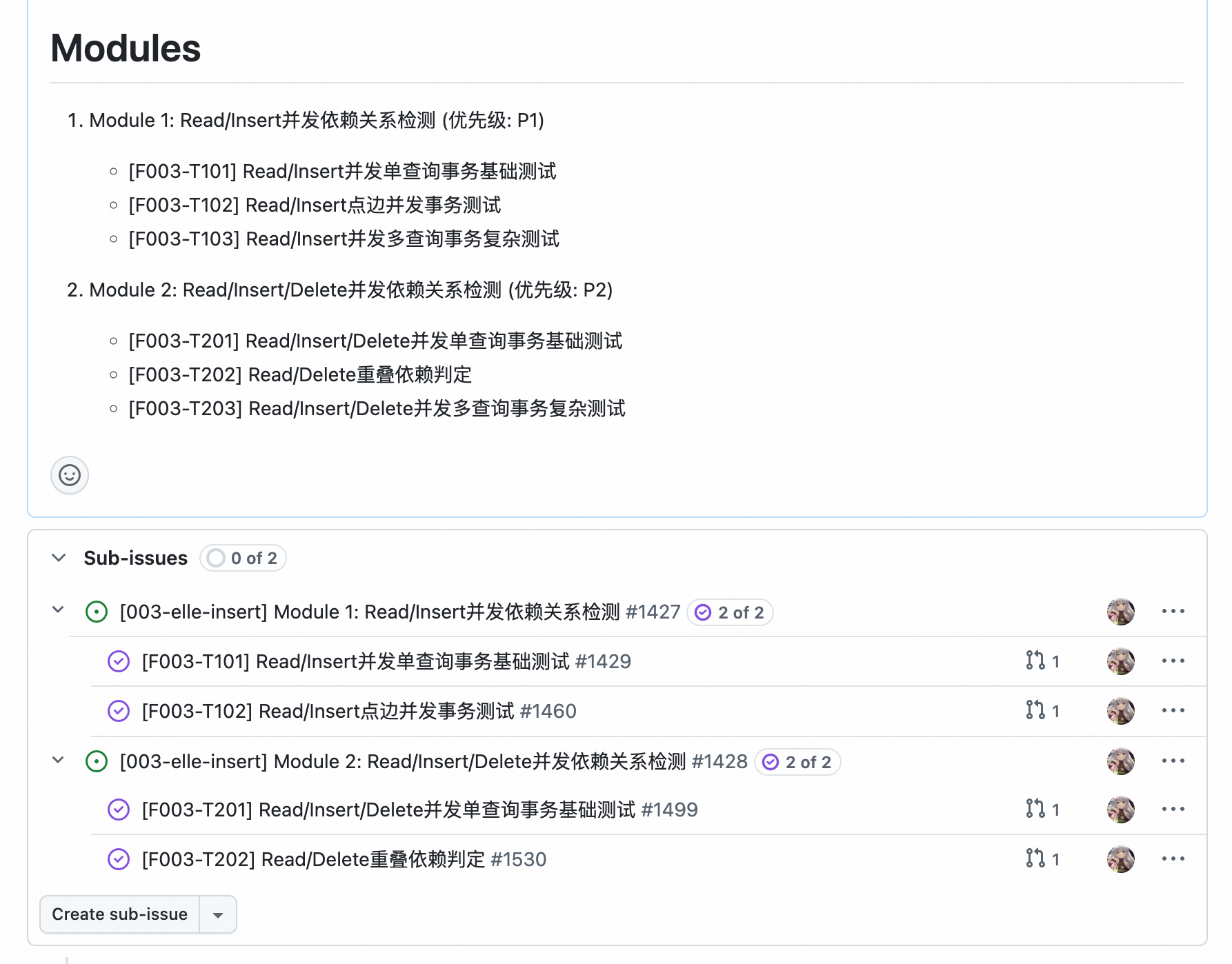
To accommodate this usage pattern, we designed two separate Commands: sync-module and sync-task. They accept a Module ID or Task ID and generate the corresponding Issue, automatically completing the Sub-Issue linking. When the content of these Modules or Tasks is modified, the same two commands can be reused to update without needing to recreate.
Implement Phase: Preserving Traditional Development
In this phase, we don’t mandate the use of /speckit.implement. Instead, we allow the task to be handed off to the corresponding developer for implementation. It doesn’t matter which tool they use to generate code (or even “old-school manual coding”), because the comprehensive context and specifications already provide sufficient constraints to naturally produce high-quality code.
We also recognize the importance of testing, requiring that all Tasks must be supplemented with corresponding CI tests after implementation, ensuring they can execute correctly in an isolated test environment. This is also an area where current large language models excel, so we won’t elaborate further.
GitHub Integration: A More Automated Issue/PR Experience
Inspired by the Commands functionality, we further integrated more GitHub operations into the Coding Agent. Currently, we have implemented two core capabilities: Issue creation and PR creation. In these two Commands, we incorporated two very important paradigms:
Context Collection
Context is critically important for Bug Issues. While Issue and PR creation already encourage users to fill in context thoroughly using templates, this step is extremely tedious. Our developers often need to copy terminal error messages, relevant code snippets, and error reproduction commands multiple times — and the useful information in these logs is minimal with poor readability.
We introduced the create-issue and create-pr commands. Users can directly select relevant content, and the model reads the corresponding terminal or file content, automatically parsing and generating organized content for submission. Developers only need to review the final generated result, which is extremely convenient.
Below is a simple example: by referencing error messages from the terminal and relevant source code, we prompt the model to submit an Issue and automatically configure the Parent Issue, Assignee, and Project information. In the era of large language models, this information doesn’t need to match exactly — a rough description is sufficient for the model to infer the best match.
`/create-issue` [bash:15-20][main.cpp:150:210] Check the error messages and executed code, create an issue of type bug, link to parent issue #xx, assign to "@user-xxx", and add to project "Project-xxx".
Creation Confirmation
When Git performs dangerous operations like merge or rebase, it typically displays a confirmation file for the user to review. Inspired by this, we believe that creating Issues and PRs can similarly incorporate a confirmation flow to verify Issue configurations.
Specifically, before creating an Issue or PR, the Agent provides a file for user interaction to confirm the information to be submitted, with a structure roughly as follows:
Issue Type: Bug
Issue Title: [BUG] <title>
Assignee: <assignee>
Labels: bug, <additional labels>
Project: NeuG v0.1
Parent Issue: #<parent-issue-id>

**Describe the bug**
A clear and concise description of what the bug is.

**Execution Logs**
The commands that can reproduce the issue.
1. Command 1: ...
2. Command 2: ...
...

**Expected behavior**
A clear and concise description of what you expected to happen.

**Error Message**
The error message in the terminal.
In this temporary file, the configuration parameters for creating the Issue are listed in detail, along with the specific body content. Through this file, users can clearly confirm the Issue’s type, assignee, labels, project, parent issue, and other information. Only after user confirmation does the Agent create and execute the corresponding command. This semi-structured template also ensures greater consistency in subsequently generated commands, significantly reducing unexpected situations caused by users’ unfamiliarity with commands.
Agent Skills Support
Just as we were writing this blog post, another new paradigm — Agent Skills — was rolling out broadly. We won’t discuss the comparison between Commands and Skills here, but from a product design perspective, the advantage of Agent Skills lies in encouraging users to store large scripts, templates, and other information in separate folders, while keeping only concise but critical descriptions in the core file. Moreover, Agent Skills is fully compatible with Commands operations, invoked explicitly through slash commands. Therefore, we promptly migrated our commands to the Skills format, moving templates, scripts, and other content from prompts into independent files.
.cursor
└── skills
    ├── speckit.specify
    │   ├── templates
    │   │   └── spec-template.md
    │   └── SKILL.md
    │
    ├── speckit.plan
    │   ├── templates
    │   │   └── plan-template.md
    │   └── SKILL.md
    │
    ├── speckit.tasks
    │   ├── templates
    │   │   ├── tasks-metadata-template.md
    │   │   └── tasks-module-template.md
    │   └── SKILL.md
    │
    ├── sync-modules
    │   └── SKILL.md
    │
    ├── sync-tasks
    │   └── SKILL.md
    │
    ├── create-issue
    │   ├── scripts
    │   │   └── gh-update.sh
    │   ├── templates
    │   │   ├── bug-issue.md
    │   │   └── feature-issue.md
    │   └── SKILL.md
    │
    └── create-pr
        ├── templates
        │   └── pull-request.md
        └── SKILL.md
Conclusion
Throughout our experience with Spec tools, it became evident that using Coding Agents effectively involves a wealth of techniques — from the overall product application scenarios to the crafting of individual prompts, as well as various interaction paradigms and generation logic. These details are what truly unlock the model’s capabilities, and they explain why the same programming tools produce entirely different results in different people’s hands. In the future, we will continue exploring applications of large language model programming tools across various project development scenarios, letting AI truly unleash productivity.